
In our previous two articles, we walked through building an HTML table from raw JSON data
with D3.js, and then styled it for a clean, modern presentation. During Part 2, we made an intentional
design decision: although we hid the ID column from visual display, we preserved it as a
data-id attribute on every table row (<tr data-id="...">).
Why did we do that? Because data visualizations and tables in real applications are rarely read-only. Users constantly need to interact with data—filtering records, dismissing items, and deleting rows.
In this tutorial, we will take advantage of that data-id attribute and show how to delete a
table row using D3.js. We'll cover both:
- Direct Selection & Animated Removal: Targeting the row by attribute and smoothly fading it out using D3 transitions.
- The Data-Driven Exit Pattern: Synchronizing our underlying JavaScript array and
utilizing D3's idiomatic
.exit().remove()approach.
Recapping the Row Identifier Setup
In Part 2, when we populated our rows, we stamped each <tr> with the item's unique
identifier:
const rows = tbody.selectAll("tr")
    .data(data)
    .enter()
    .append("tr")
    .attr("data-id", function(d) { return d.ID; });
If you inspect the table in your browser's Developer Tools, you'll see each row clearly identified:
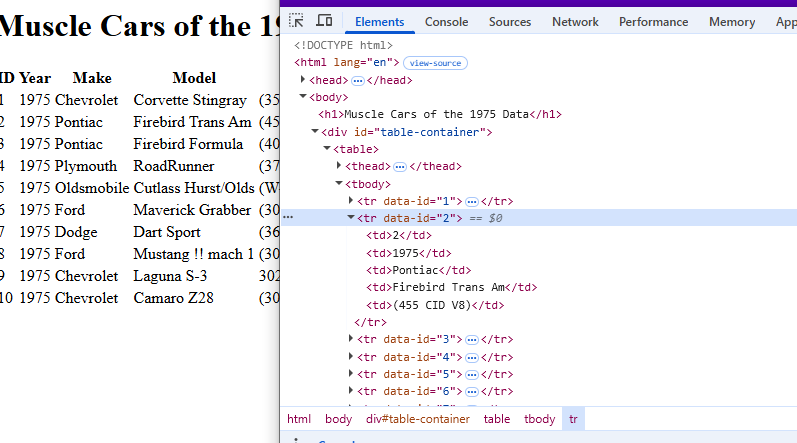
This attribute provides an exact, unique target that D3 can query and manipulate at any time.
Step 1: Adding the Action Column and Delete Button
To give the user a way to trigger the delete action, we first update our columns array to include an
Action header:
// Add "Action" as the final column
const columns = ["Year", "Make", "Model", "HP", "Action"];
When iterating over each cell in PopulateTable, we check whether the current column is
"Action". If it is, we render a button styled with a delete icon instead of plain text:
// Create a cell in each row for each column
const cells = rows.selectAll("td")
    .data(function(row) {
        return columns.map(function(column) {
            return { column: column, value: row[column], rowData: row };
        });
    })
    .enter()
    .append("td")
    .html(d => {
        if (d.column === "Action") {
            return `<button class="btn btn-sm btn-outline-danger delete-btn" data-id="${d.rowData.ID}">
                        <i class="fa fa-trash"></i> Delete
                    </button>`;
        }
        return d.value;
    });
Step 2: Smooth Row Removal with D3 Transitions
One of the great advantages of D3 over plain JavaScript is its transition engine. Rather than abruptly
yanking an element out of the DOM, D3 lets us smoothly animate the opacity and position, giving users visual
feedback before calling .remove().
Here is the RemoveRow method added to our d3ObjectsResources class:
RemoveRow = (id) => {
    // 1. Select the specific table row using our data-id attribute
    const targetRow = d3.select(`tr[data-id='${id}']`);

    // 2. Animate opacity to 0 and slide slightly, then remove from DOM
    targetRow
        .transition()
        .duration(350)
        .style("opacity", "0")
        .style("transform", "translateX(20px)")
        .remove();

    // 3. Keep the underlying data array synchronized
    this.tableData = this.tableData.filter(car => car.ID !== Number(id));

    console.log(`Row with ID ${id} removed. Remaining records:`, this.tableData.length);
}
How Chaining .remove() Works in D3
When you chain .remove() to a D3 transition, D3 automatically waits until the transition
duration finishes before removing the DOM node. If you called .remove() directly on the
selection without a transition, it would disappear instantly.
Step 3: Wiring Up Event Handlers
We connect the click event inside our EventHandlers() method. Using D3’s event handling, we
capture the clicked button’s data-id and delegate to RemoveRow:
EventHandlers = () => {
    // Listen for clicks on any delete button in the table
    d3.selectAll(".delete-btn").on("click", (event) => {
        const btn = d3.select(event.currentTarget);
        const id = btn.attr("data-id");
        this.RemoveRow(id);
    });
}
The Alternative: Pure D3 Data-Driven Exit Pattern
As an Angular developer, I love keeping UI state in sync with data models. D3 features a legendary concept known as the General Update Pattern (Enter, Update, Exit). If you prefer updating your data first and letting D3 manage the DOM diffing, here is how you do it:
RemoveRowDataDriven = (id) => {
    // 1. Mutate the data array first
    this.tableData = this.tableData.filter(car => car.ID !== Number(id));

    // 2. Re-bind the updated data to the rows using a key function
    const rows = d3.select("tbody")
        .selectAll("tr")
        .data(this.tableData, d => d.ID); // <-- Crucial key function!

    // 3. Any row whose ID is no longer present falls into the EXIT selection
    rows.exit()
        .transition()
        .duration(350)
        .style("opacity", "0")
        .remove();
}
Why the Key Function (d => d.ID) Matters
Without the second argument in .data(data, d => d.ID), D3 matches elements by index
position (0, 1, 2...). If you delete row 2, D3 would think the last row was removed and
overwrite row 2's contents! Supplying the key function guarantees that D3 tracks elements by their true
identity.
Try It Live: Interactive Demo
Here is the finished functionality running live. Click any Delete button to see the row animate away using D3, and watch the record counter update in real time. You can reset the table at any point with the reset button below.
1975 Muscle Cars Inventory
Dynamic D3.js interactive tableThe Complete d3ObjectsResources.js Class
Below is our full, refactored ES6 class incorporating table creation, styling attributes, action column rendering, and animated row deletion:
class d3ObjectsResources {
    constructor() {
        this.tableData = [
            { ID: 1, Year: '1975', Make: 'Chevrolet', Model: 'Corvette Stingray', HP: '(350 V8)' },
            { ID: 2, Year: '1975', Make: 'Pontiac', Model: 'Firebird Trans Am', HP: '(455 CID V8)' },
            { ID: 3, Year: '1975', Make: 'Pontiac', Model: 'Firebird Formula', HP: '(400 CID V8)' },
            { ID: 4, Year: '1975', Make: 'Plymouth', Model: 'RoadRunner', HP: '(375 V8)' },
            { ID: 5, Year: '1975', Make: 'Oldsmobile', Model: 'Cutlass Hurst/Olds', HP: '(W-25)' },
            { ID: 6, Year: '1975', Make: 'Ford', Model: 'Maverick Grabber', HP: '(302 V8)' },
            { ID: 7, Year: '1975', Make: 'Dodge', Model: 'Dart Sport', HP: '(360)' },
            { ID: 8, Year: '1975', Make: 'Ford', Model: 'Mustang II Mach 1', HP: '(302 V8)' },
            { ID: 9, Year: '1975', Make: 'Chevrolet', Model: 'Laguna S-3', HP: '302' },
            { ID: 10, Year: '1975', Make: 'Chevrolet', Model: 'Camaro Z28', HP: '(302 V8)' }
        ];

        this.Init();
    }

    Init = () => {
        console.log('INIT: Loading D3 Table...');
        this.PopulateTable(this.tableData);
        this.EventHandlers();
    }

    EventHandlers = () => {
        d3.selectAll(".delete-btn").on("click", (event) => {
            const btn = d3.select(event.currentTarget);
            const id = btn.attr("data-id");
            this.RemoveRow(id);
        });
    }

    RemoveRow = (id) => {
        // Animate and remove from the DOM
        d3.select(`tr[data-id='${id}']`)
            .transition()
            .duration(350)
            .style("opacity", "0")
            .style("transform", "translateX(20px)")
            .remove();

        // Synchronize JavaScript data array
        this.tableData = this.tableData.filter(car => car.ID !== Number(id));
    }

    PopulateTable = (data) => {
        const columns = ["Year", "Make", "Model", "HP", "Action"];
        const container = d3.select("#table-container");
        container.html(""); // Clear any existing content

        const table = container.append("table").attr("class", "table table-hover");
        const thead = table.append("thead");
        const tbody = table.append("tbody");

        // Header row
        thead.append("tr")
            .selectAll("th")
            .data(columns)
            .enter()
            .append("th")
            .text(d => d);

        // Data rows with data-id attribute
        const rows = tbody.selectAll("tr")
            .data(data, d => d.ID)
            .enter()
            .append("tr")
            .attr("data-id", d => d.ID);

        // Cells
        rows.selectAll("td")
            .data(row => columns.map(column => ({ column, value: row[column], rowData: row })))
            .enter()
            .append("td")
            .html(d => {
                if (d.column === "Action") {
                    return `<button class="btn btn-sm btn-outline-danger delete-btn" data-id="${d.rowData.ID}">
                                <i class="fa fa-trash"></i> Delete
                            </button>`;
                }
                return d.value;
            });
    }
}

export default d3ObjectsResources;
Key Takeaways
- Attribute Binding is Powerful: Keeping
data-idon table rows during initial generation makes targeted element manipulation effortless. - Transitions Elevate UX: Chaining
.transition().duration(...).style("opacity", 0).remove()gives a smooth, professional feel compared to abrupt DOM deletion. - Synchronize State: Always keep your underlying data array in sync with DOM removals so subsequent filters, sorts, or server payloads remain accurate.
- Keys for Data Joins: When using D3's General Update Pattern with
.exit().remove(), always supply a key function (e.g.d => d.ID) to prevent unexpected rendering bugs.
With these three articles, you now have a complete, production-ready foundation for building, styling, and interactively managing tables with D3.js!